Valorant Sensitivity: Flawless CS2 Conversion for Perfect Aim
Valorant Sensitivity: Flawless CS2 Conversion for Perfect Aim
Switching from CS2 to Valorant? Finding the right sensitivity is crucial for maintaining your aim consistency. Many players struggle with the different feel of Valorant’s aiming mechanics. This guide provides a step-by-step method to convert your CS2 sensitivity to Valorant, ensuring a smooth transition and optimal performance. Learn how to replicate your muscle memory and dominate in Valorant.
CS2 to Valorant Sensitivity Conversion: The Formula
The difference in Field of View (FOV) between CS2 and Valorant necessitates a sensitivity adjustment. While both games use similar aiming mechanics, the perceived speed of mouse movement differs. Here’s the formula to convert your CS2 sensitivity to Valorant:
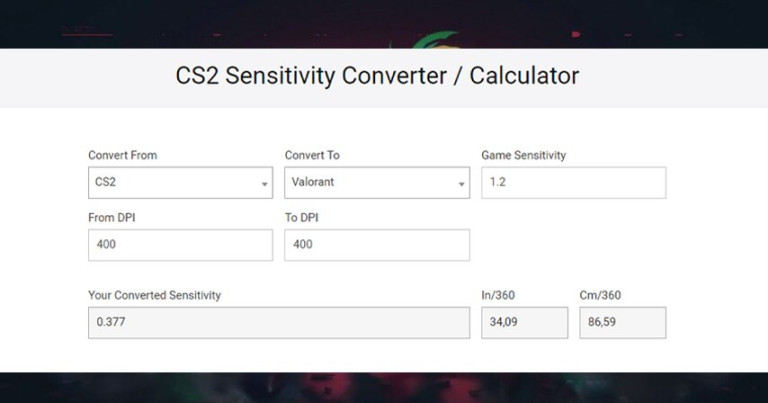
- Valorant Sensitivity = CS2 Sensitivity x 3.18181818
This formula accounts for the FOV difference, allowing you to maintain a similar aiming feel. For example, if your CS2 sensitivity is 1.0, your Valorant sensitivity should be approximately 0.318. This conversion ensures that the distance your crosshair travels on the screen for a given mouse movement is consistent across both games.
Why This Conversion Matters
Maintaining consistent aim is paramount in tactical shooters. A proper sensitivity conversion bridges the gap between CS2 and Valorant, allowing you to leverage your existing muscle memory. This reduces the learning curve and enables you to focus on game sense and strategy, rather than struggling with aiming inconsistencies. Many professional players utilize this conversion method when transitioning between the two games.
Fine-Tuning Your Valorant Sensitivity
While the formula provides a solid starting point, individual preferences and mouse DPI can influence the ideal sensitivity. After applying the conversion, spend time in Valorant’s practice range to fine-tune your settings. Pay attention to how your crosshair feels when tracking targets and making micro-adjustments. Experiment with small adjustments (e.g., 0.01 increments) until you find a sensitivity that feels comfortable and responsive.
Consider these factors when fine-tuning:
- Mouse DPI: Lower DPIs generally require higher in-game sensitivity.
- Monitor Resolution: Higher resolutions can affect perceived mouse speed.
- Personal Preference: Ultimately, the best sensitivity is the one that feels most natural to you.
Dominate Valorant with Consistent Aim
Converting your CS2 sensitivity is the first step towards mastering Valorant’s aiming mechanics. By replicating your existing muscle memory, you can focus on improving your game sense, strategy, and teamwork. Consistent aim is a cornerstone of success in Valorant’s competitive environment, allowing you to consistently land shots and secure crucial kills.
Technical Precision Requires Perfect Connection
The detailed analysis shows how Valorant is a game of millimetric precision. But even mastering concepts, network problems can sabotage perfect executions – your smoke might deploy late, your flash might not blind at right timing, your peek might be punished before you even see the enemy.
NoPing eliminates these variables across 3,000+ games: Multi-Connection technology reduces lag by up to 80% and eliminates up to 100% of packet loss and jitter. Zero interruption, zero excuses. Your technical execution becomes as reliable as your theoretical knowledge.
Already know the theory? Now ensure the practice. Free 7-day trial and discover what it’s like to play Valorant when complex mechanics work exactly as you planned.
Published by automated system on February 3, 2026 at 2:00 PM